APS Navigator – App Pagination System
This library is just a wrapper around Navigator 2.0 and Router/Pages API that tries to make their use easier:

Basic feature set

What we’ve tried to achieve:
- Simple API
- Easy setup
- Minimal amount of “new classes types” to learn:
- No need to extend(or implement) anything
- Web support (check the images in the following sections):
- Back/Forward buttons
- Dynamic URLs
- Static URLs
- Recover app state from web history
- Control of Route Stack:
- Add/remove Pages at a specific position
- Add multiples Pages at once
- Remove a range of pages at once
- Handles Operational System events
- Internal(Nested) Navigators

What we didn’t try to achieve:
- To use code generation
- Don’t get me wrong. Code generation is a fantastic technique that makes code clear and coding faster – we have great libraries that are reference in the community and use it
- The thing is: It doesn’t seems natural to me have to use this kind of procedure for something “basic” as navigation
- To use Strongly-typed arguments passing
Overview
1 – Create the Navigator and define the routes:
final navigator = APSNavigator.from(
  routes: {
    '/dynamic_url_example{?tab}': DynamicURLPage.route,
    '/': ...
  },
);
2 – Configure MaterialApp to use it:
class MyApp extends StatelessWidget {
  const MyApp({Key? key}) : super(key: key);

  @override
  Widget build(BuildContext context) {
    return MaterialApp.router(
      routerDelegate: navigator,
      routeInformationParser: navigator.parser,
    );
  }
}
3 – Create the widget Page (route):
class DynamicURLPage extends StatefulWidget {
  final int tabIndex;
  const DynamicURLPage({Key? key, required this.tabIndex}) : super(key: key);

  @override
  _DynamicURLPageState createState() => _DynamicURLPageState();

  // Builder function
  static Page route(RouteData data) {
    final tab = data.values['tab'] == 'books' ? 0 : 1;
    return MaterialPage(
      key: const ValueKey('DynamicURLPage'), // Important! Always include a key
      child: DynamicURLPage(tabIndex: tab),
    );
  }
}
- You don’t need to use a static function as PageBuilder, but it seems to be a good way to organize things.
- Important: AVOID using ‘const‘ keyword at
MaterialPageorDynamicURLPagelevels, or Pop may not work correctly with Web History. - Important: Always include a Key.
4 – Navigate to it:
 APSNavigator.of(context).push(
    path: '/dynamic_url_example',
    params: {'tab': 'books'},
 );
- The browser’s address bar will display:
/dynamic_url_example?tab=books. - The
Pagewill be created and put at the top of the Route Stack.
The following sections describe better the above steps.
Usage
1 – Creating the Navigator and defining the Routes:
final navigator = APSNavigator.from(

  // Defines the initial route - default is '/':
  initialRoute: '/dynamic_url_example',

  //  Defines the initial route params - default is 'const {}':
  initialParams: {'tab': '1'},

  routes: {
    // Defines the location: '/static_url_example'
    '/static_url_example': PageBuilder..,

    // Defines the location (and queries): '/dynamic_url_example?tab=(tab_value)&other=(other_value)'
    // Important: Notice that the '?' is used only once
    '/dynamic_url_example{?tab,other}': PageBuilder..,

    // Defines the location (and path variables): '/posts' and '/posts/(post_id_value)'
    '/posts': PageBuilder..,
    '/posts/{post_id}': PageBuilder..,

    // Defines the location (with path and query variables): '/path/(id_value)?q1=(q1_value)&q2=(q2_value)'.
    '/path/{id}?{?q1,q2}': PageBuilder..,

    // Defines app root - default
    '/': PageBuilder..,
  },
);
routes is just a map between Templates and Page Builders:
-
Templatesare simple strings with predefined markers to Path ({a}) and Query({?a,b,c..}) values. -
Page Buildersare plain functions that return aPageand receive aRouteData. Check the section 3 bellow.
Given the configuration above, the app will open at: /dynamic_url_example?tab=1.
2 – Configure MaterialApp:
After creating a Navigator, we need to set it up to be used:
- Set it as
MaterialApp.router.routeDelegate. - Remember to also add the
MaterialApp.router.routeInformationParser:
class MyApp extends StatelessWidget {
  const MyApp({Key? key}) : super(key: key);

  @override
  Widget build(BuildContext context) {
    return MaterialApp.router(
      routerDelegate: navigator,
      routeInformationParser: navigator.parser,
    );
  }
}
3 – Creating the widget Page(route):
When building a Page:
- The library tries to match the address
templateswith the current address. E.g.:- Template:
/dynamic_url_example/{id}{?tab,other}' - Address:
/dynamic_url_example/10?tab=1&other=abc
- Template:
- All paths and queries values are extracted and included in a
RouteData.datainstance. E.g.:{'id': '10', 'tab': '1', 'other': 'abc'}
- This istance is passed as param to the
PageBuilderfunction –static Page route(RouteData data)… - A new Page instance is created and included at the Route Stack – you check that easily using the dev tools.
class DynamicURLPage extends StatefulWidget {
  final int tabIndex;
  const DynamicURLPage({Key? key, required this.tabIndex}) : super(key: key);

  @override
  _DynamicURLPageState createState() => _DynamicURLPageState();

  // You don't need to use a static function as Builder,
  // but it seems to be a good way to organize things
  static Page route(RouteData data) {
    final tab = data.values['tab'] == 'books' ? 0 : 1;
    return MaterialPage(
      key: const ValueKey('DynamicURLPage'), // Important! Always include a key
      child: DynamicURLPage(tabIndex: tab),
    );
  }
}
4 – Navigating to Pages:
Example Link: All Navigating Examples
4.1 – To navigate to a route with query variables:
- Template:
/dynamic_url_example{?tab,other} - Address:
/dynamic_url_example?tab=books&other=abc
 APSNavigator.of(context).push(
    path: '/dynamic_url_example',
    params: {'tab': 'books', 'other': 'abc'}, // Add query values in [params]
 );
4.2 – To navigate to a route with path variables:
- Template:
/posts/{post_id} - Address:
/posts/10
 APSNavigator.of(context).push(
    path: '/post/10', // set path values in [path]
 );
4.3 – You can also include params that aren’t used as query variables:
- Template:
/static_url_example - Address:
/static_url_example
 APSNavigator.of(context).push(
    path: '/static_url_example',
    params: {'tab': 'books'}, // It'll be added to [RouteData.values['tab']]
 );
Details
1. Dynamic URLs Example
Example Link: Dynamic URLs Example
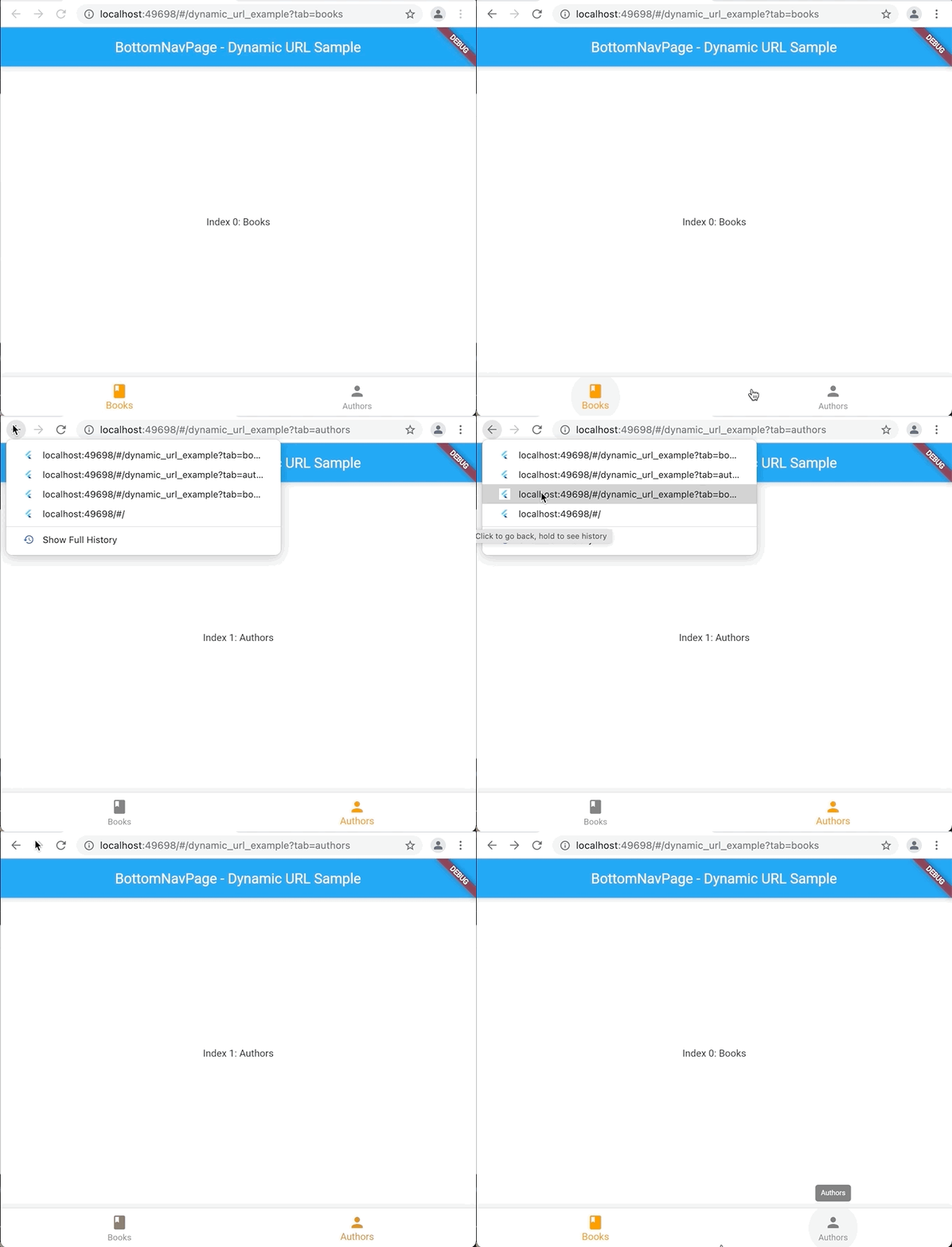
When using dynamic URLs, changing the app’s state also changes the browser’s URL. To do that:
- Include queries in the templates. E.g:
/dynamic_url_example{?tab} - Call
updateParamsmethod to update browser’s URL:
  final aps = APSNavigator.of(context);
  aps.updateParams(
    params: {'tab': index == 0 ? 'books' : 'authors'},
  );
- The method above will include a new entry on the browser’s history.
- Later, if the user selects such entry, we can recover the previous widget’s
Stateusing:
  @override
  void didUpdateWidget(DynamicURLPage oldWidget) {
    super.didUpdateWidget(oldWidget);
    final values = APSNavigator.of(context).currentConfig.values;
    tabIndex = (values['tab'] == 'books') ? 0 : 1;
  }
What is important to know:
- Current limitation: Any value used at URL must be saved as
string. - Don’t forget to include a
Keyon thePagecreated by thePageBuilderto everything works properly.
2. Static URLs Example
Example Link: Static URLs Example
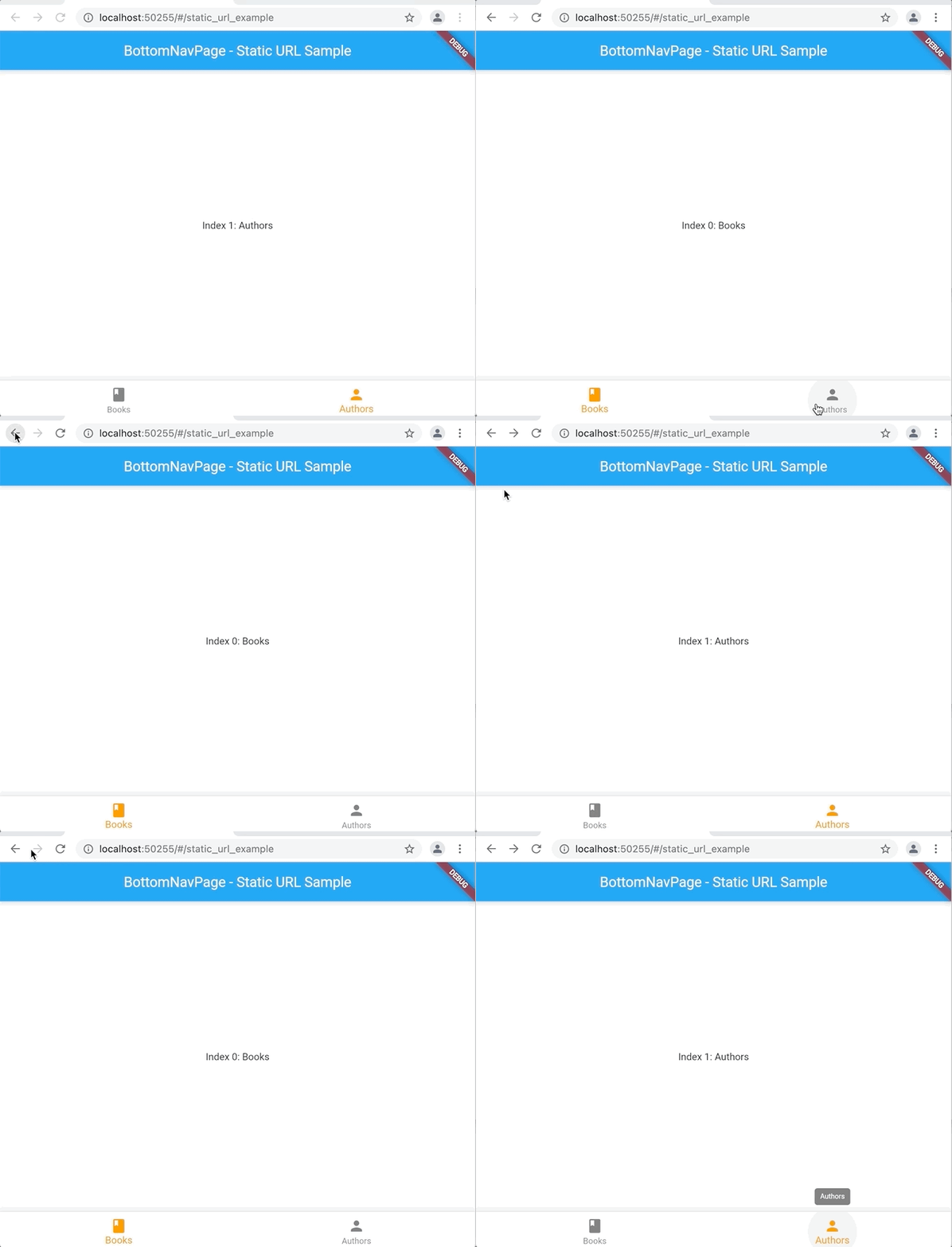
When using static URLs, changing the app’s state doesn’t change the browser’s URL, but it’ll generate a new entry on the history. To do that:
- Don’t include queries on route templates. E.g:
/static_url_example - As we did with Dynamic’s URL, call
updateParamsmethod again:
  final aps = APSNavigator.of(context);
  aps.updateParams(
    params: {'tab': index == 0 ? 'books' : 'authors'},
  );
- Then, allow
Staterestoring from browser’s history:
  @override
  void didUpdateWidget(DynamicURLPage oldWidget) {
    super.didUpdateWidget(oldWidget);
    final values = APSNavigator.of(context).currentConfig.values;
    tabIndex = (values['tab'] == 'books') ? 0 : 1;
  }
What is important to know:
- Don’t forget to include a
Keyon thePagecreated by thePageBuilderto everything works properly.
3. Return Data Example
Example Link: Return Data Example
Push a new route and wait the result:
  final selectedOption = await APSNavigator.of(context).push(
     path: '/return_data_example',
  );
Pop returning the data:
APSNavigator.of(context).pop('Do!');
What is important to know:
- Data will only be returned once.
- In case of user navigate your app and back again using the browser’s history, the result will be returned at
didUpdateWidgetmethod asresult,instead ofawaitcall.
  @override
  void didUpdateWidget(HomePage oldWidget) {
    super.didUpdateWidget(oldWidget);
    final params = APSNavigator.of(context).currentConfig.values;
    result = params['result'] as String;
    if (result != null) _showSnackBar(result!);
  }
4. Multi Push
Example Link: Multi Push Example
Push a list of the Pages at once:
  APSNavigator.of(context).pushAll(
    // position: (default is at top)
    list: [
      ApsPushParam(path: '/multi_push', params: {'number': 1}),
      ApsPushParam(path: '/multi_push', params: {'number': 2}),
      ApsPushParam(path: '/multi_push', params: {'number': 3}),
      ApsPushParam(path: '/multi_push', params: {'number': 4}),
    ],
  );
In the example above ApsPushParam(path: '/multi_push', params: {'number': 4}), will be the new top.
What is important to know:
- You don’t necessarily have to add at the top; you can use the
positionparam to add the routes at the middle of Route Stack. - Don’t forget to include a
Keyon thePagecreated by thePageBuilderto everything works properly.
5. Multi Remove
Example Link: Multi Remove Example
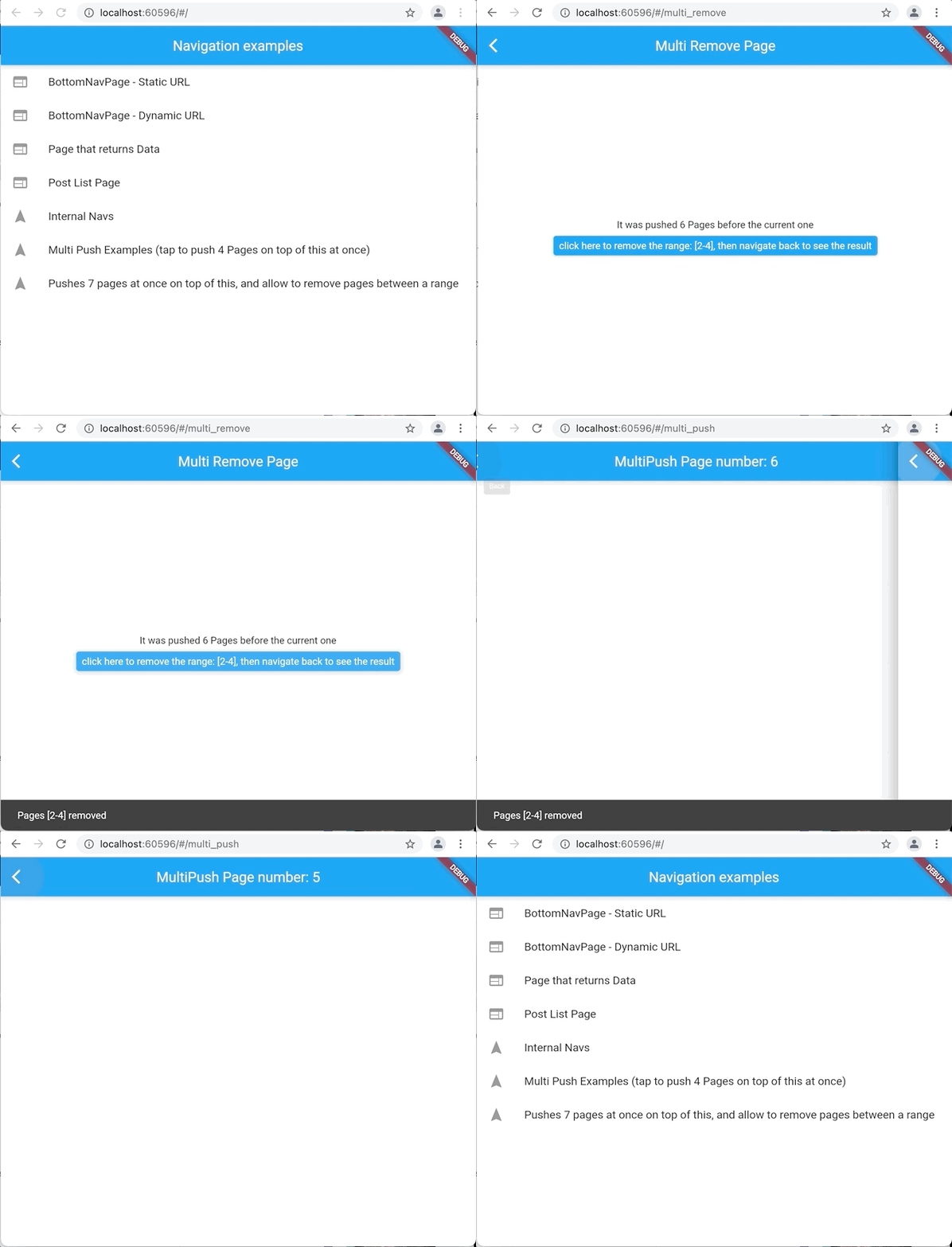
Remove all the Pages you want given a range:
APSNavigator.of(context).removeRange(start: 2, end: 5);
6. Internal (Nested) Navigators
Example Link: Internal Navigator Example
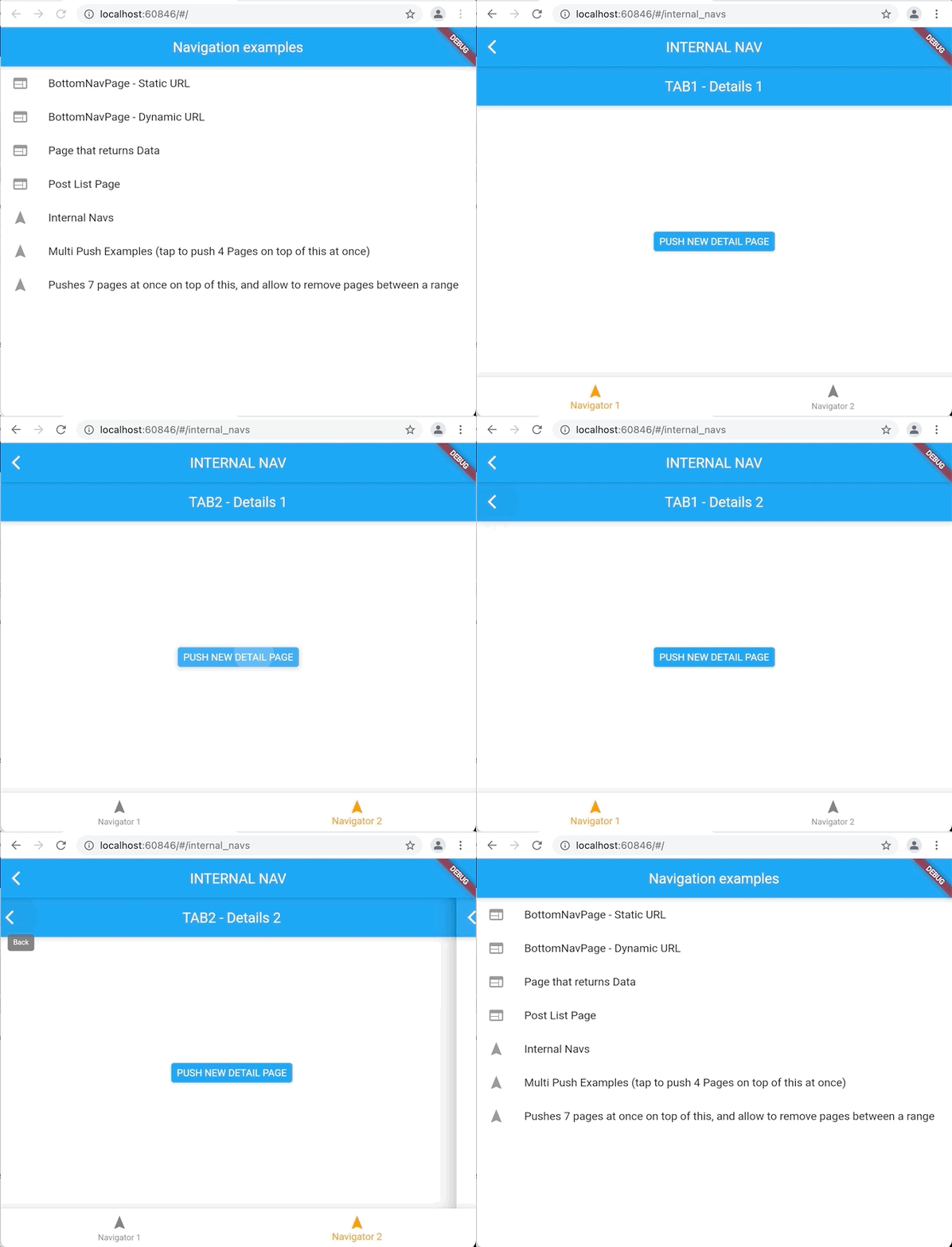
class InternalNavigator extends StatefulWidget {
  final String initialRoute;

  const InternalNavigator({Key? key, required this.initialRoute})
      : super(key: key);

  @override
  _InternalNavigatorState createState() => _InternalNavigatorState();
}

class _InternalNavigatorState extends State<InternalNavigator> {
  late APSNavigator childNavigator = APSNavigator.from(
    parentNavigator: navigator,
    initialRoute: widget.initialRoute,
    initialParams: {'number': 1},
    routes: {
      '/tab1': Tab1Page.route,
      '/tab2': Tab2Page.route,
    },
  );

  @override
  void didChangeDependencies() {
    super.didChangeDependencies();
    childNavigator.interceptBackButton(context);
  }

  @override
  Widget build(BuildContext context) {
    return Router(
      routerDelegate: childNavigator,
      backButtonDispatcher: childNavigator.backButtonDispatcher,
    );
  }
}
What is important to know:
- Current limitation: Browser’s URL won’t update based on internal navigator state
Warning & Suggestions
- Although this package is already useful, it’s still in the Dev stage.
- I’m not sure if creating yet another navigating library is something good – we already have a lot of confusion around it today.
- This lib is not back-compatible with the old official Navigation API – at least for now (Is it worth it?).
- Do you have any ideas or found a bug? Fell free to open an issue! 🙂
- Do you want to know the current development stage? Check the Project’s Roadmap.
Download APS Navigator package source code on GitHub

Provides the list of the opensource Flutter apps collection with GitHub repository.
