A flutter package which will help you to generate pin code fields with beautiful design and animations. Can be useful for OTP or pin code inputs

Features
- Automatically focuses the next field on typing and focuses previous field on deletation
- Can be set to any length. (3-6 fields recommended)
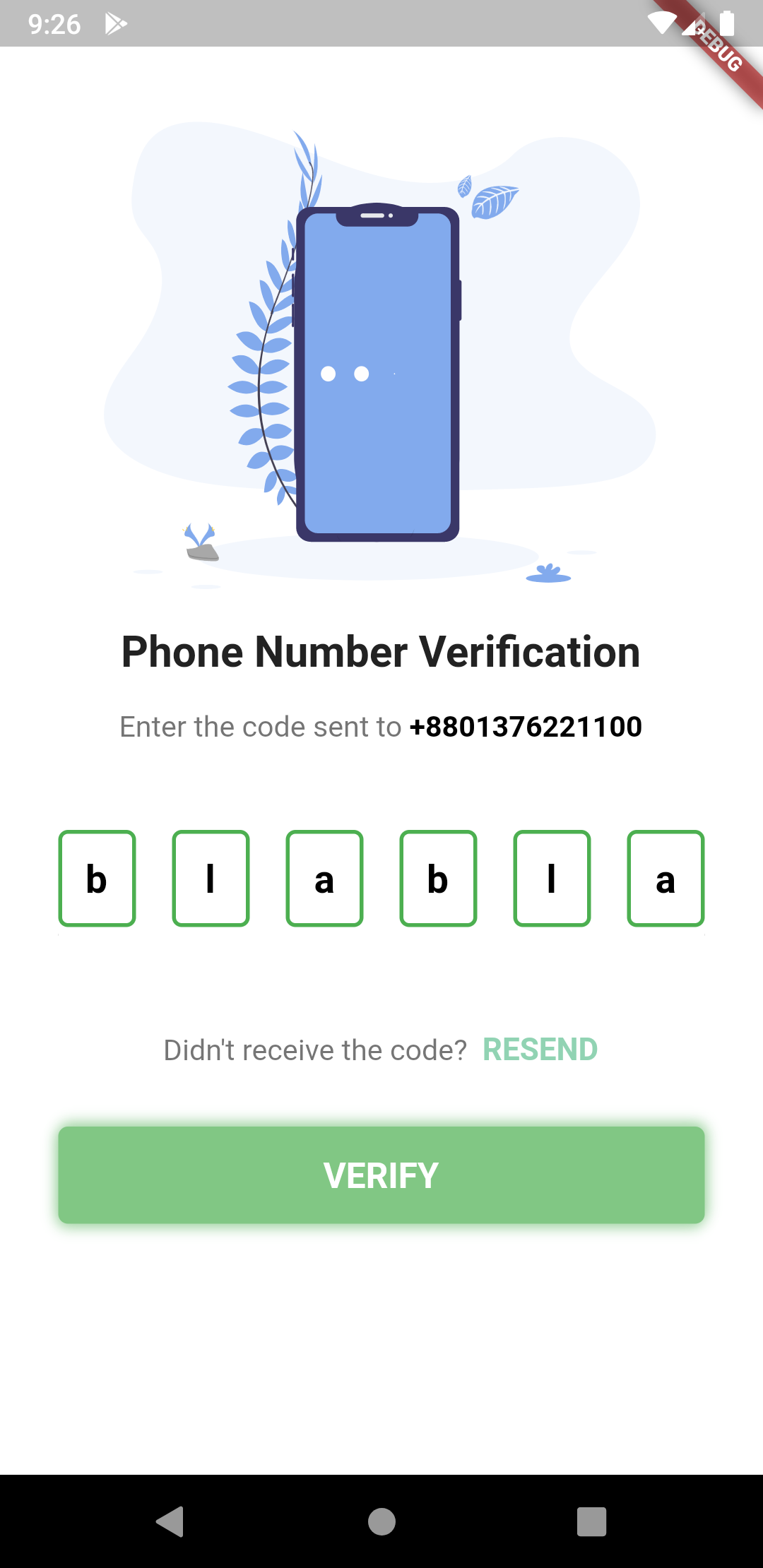
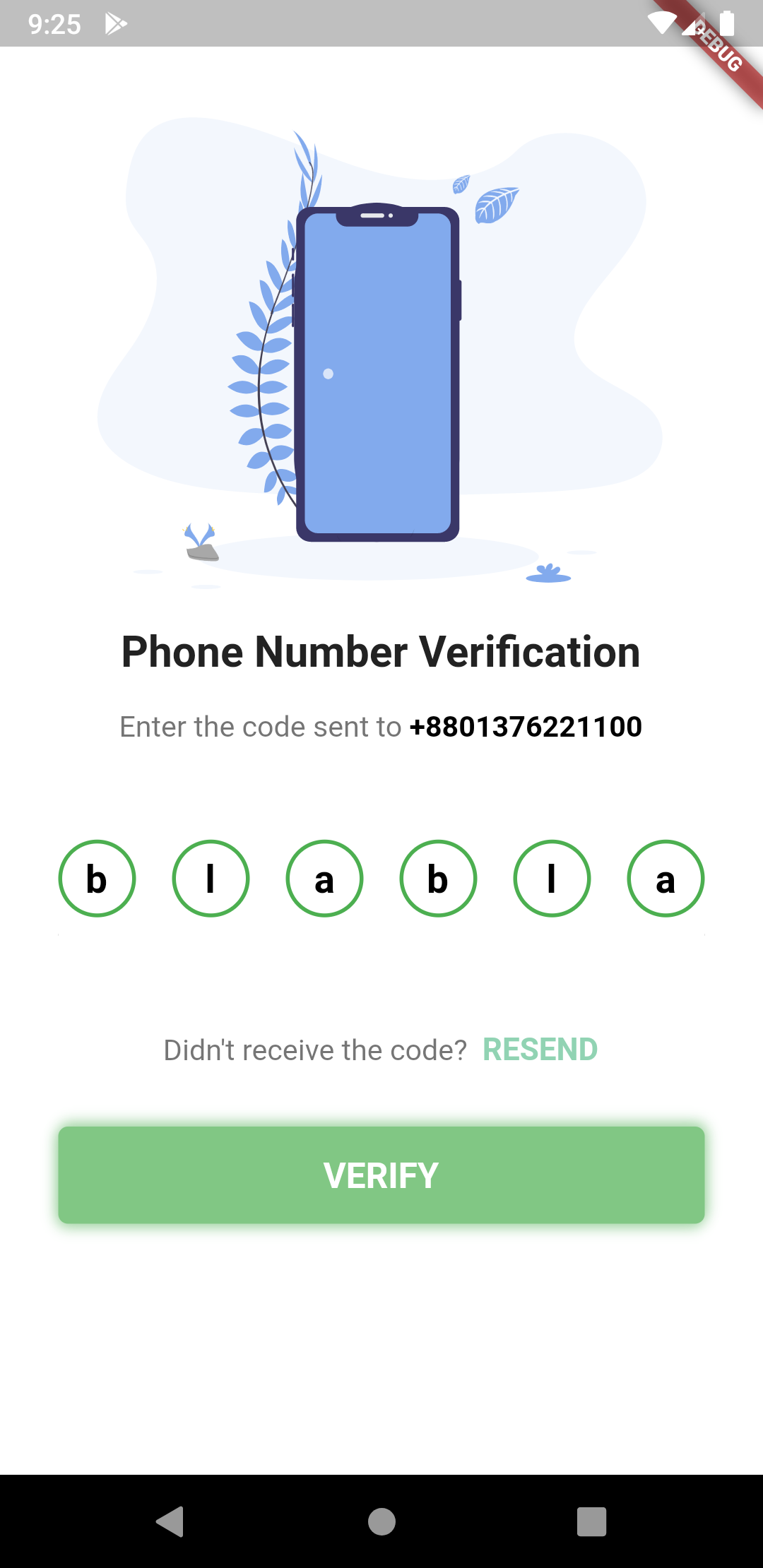
- 3 different shapes for text fields
- Highly customizable
- 3 different types of animation for input texts
- Animated active, inactive, selected and disabled field color switching
- Autofocus option
- Otp-code pasting from clipboard
- iOS autofill support
- Error animation. Currently have shake animation only. Watch the example app for how to integrate.
- Works with Flutter’s Form. You can use Form validator right off the bat.
- Get currently typed text and use your condition to validate it. (for example: if (currentText.length != 6 || currentText != “your desired code”))
Getting Started
Demo

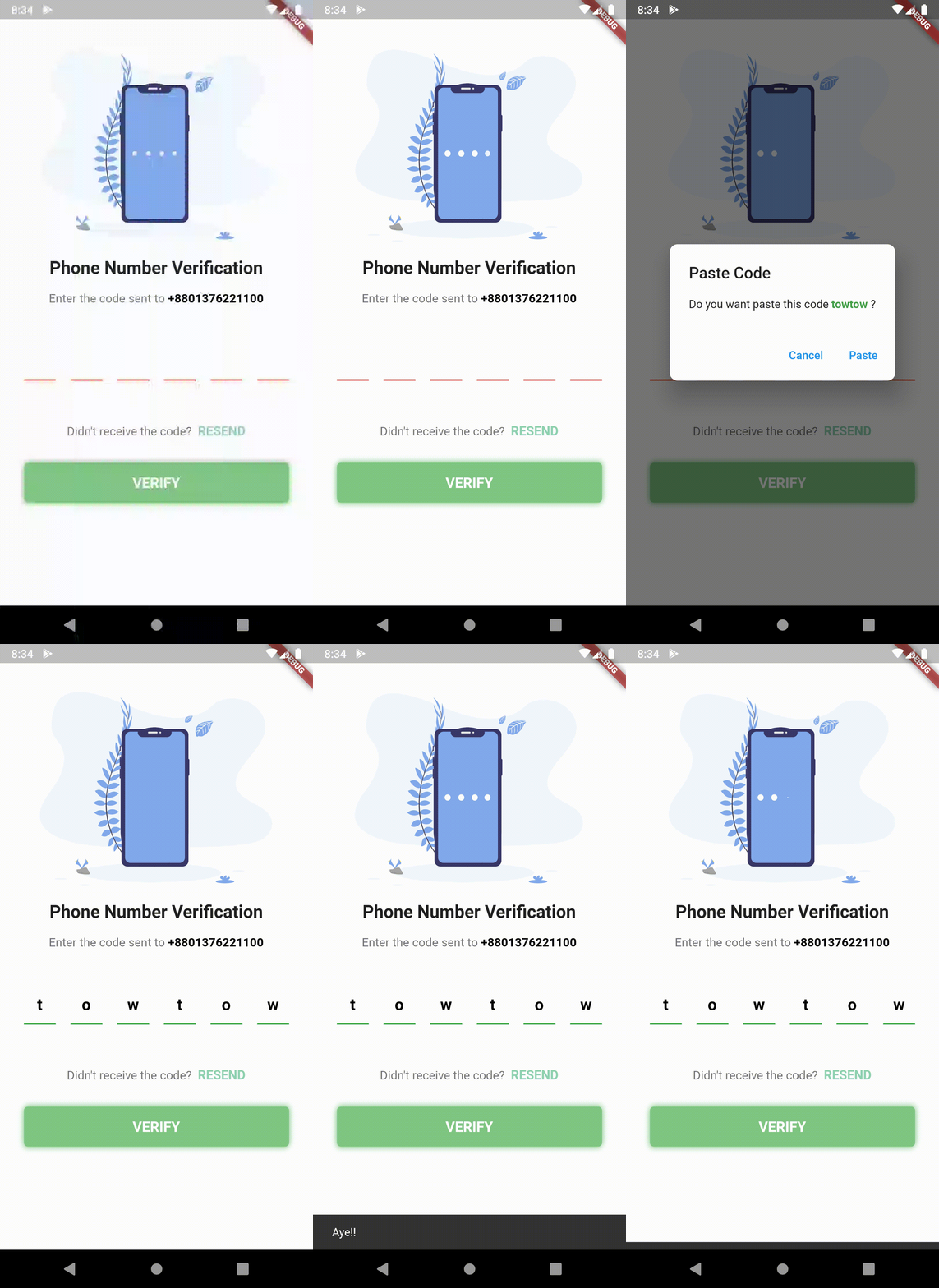
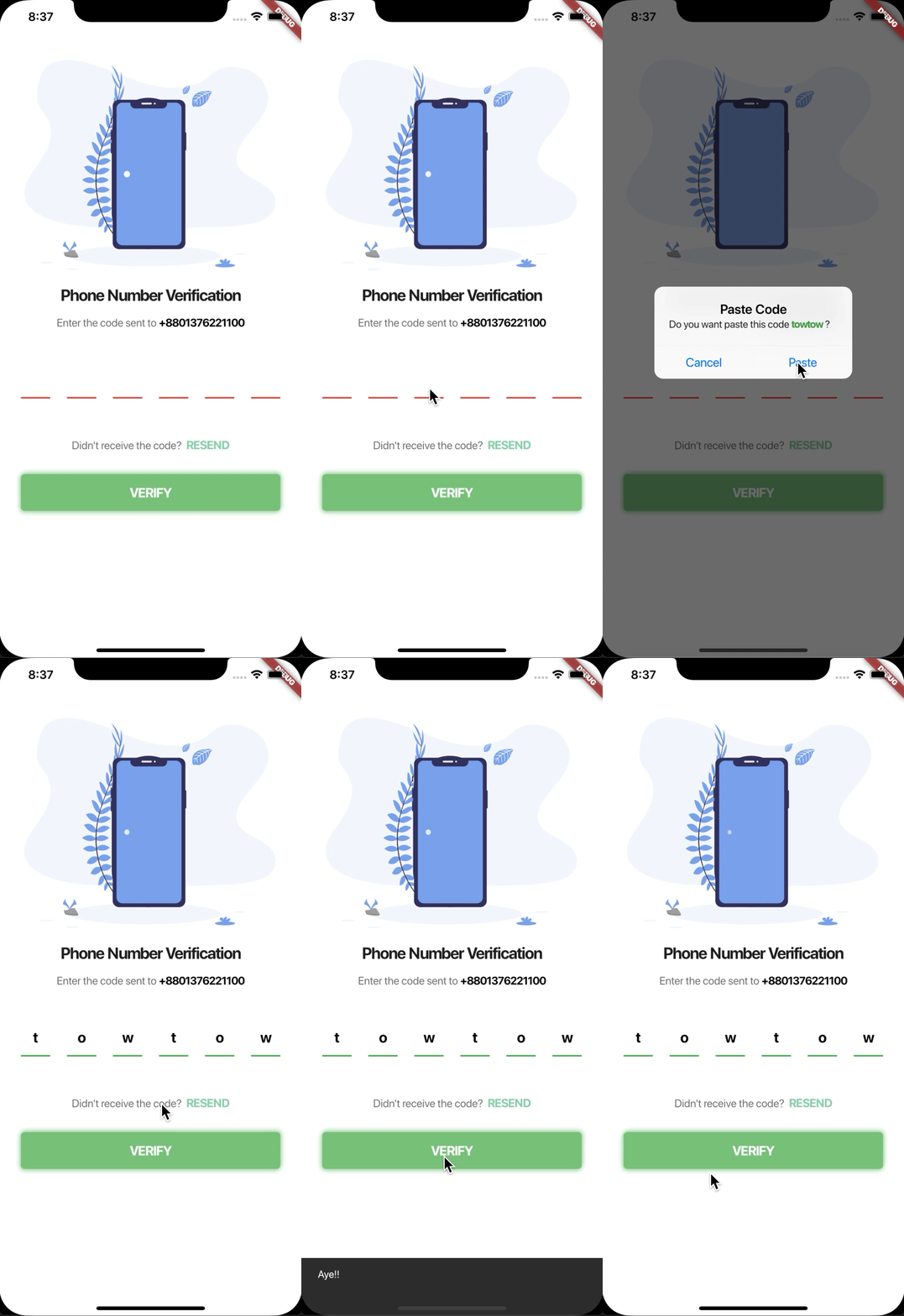
Different Shapes

Notes
- To enable “Fill color” for each cells,
enableActiveFillmust be set totrue. The default value isfalse. - To change the keyboard type, for example to use only number keyboard, or only for email use
textInputTypeparameter, default is [TextInputType.visiblePassword] FocosNodeandTextEditingControllerwill get disposed automatically. UseautoDisposeControllers = falseto disable it.- to use v5.0.0 or above, developers must have Flutter SDK 1.20.0 or above.
Properties
  /// The [BuildContext] of the application
  final BuildContext appContext;

  /// length of how many cells there should be. 3-8 is recommended by me
  final int length;

  /// you already know what it does i guess :P default is false
  final bool obsecureText;

  /// returns the current typed text in the fields
  final ValueChanged<String> onChanged;

  /// returns the typed text when all pins are set
  final ValueChanged<String> onCompleted;

  /// returns the typed text when user presses done/next action on the keyboard
  final ValueChanged<String> onSubmitted;

  /// the style of the text, default is [ fontSize: 20, color: Colors.black, fontWeight: FontWeight.bold]
  final TextStyle textStyle;

  /// the style of the pasted text, default is [fontWeight: FontWeight.bold] while
  /// [TextStyle.color] is [ThemeData.accentColor]
  final TextStyle pastedTextStyle;

  /// background color for the whole row of pin code fields. Default is [Colors.white]
  final Color backgroundColor;

  /// This defines how the elements in the pin code field align. Default to [MainAxisAlignment.spaceBetween]
  final MainAxisAlignment mainAxisAlignment;

  /// [AnimationType] for the text to appear in the pin code field. Default is [AnimationType.slide]
  final AnimationType animationType;

  /// Duration for the animation. Default is [Duration(milliseconds: 150)]
  final Duration animationDuration;

  /// [Curve] for the animation. Default is [Curves.easeInOut]
  final Curve animationCurve;

  /// [TextInputType] for the pin code fields. default is [TextInputType.visiblePassword]
  final TextInputType textInputType;

  /// If the pin code field should be autofocused or not. Default is [false]
  final bool autoFocus;

  /// Should pass a [FocusNode] to manage it from the parent
  final FocusNode focusNode;

  /// A list of [TextInputFormatter] that goes to the TextField
  final List<TextInputFormatter> inputFormatters;

  /// Enable or disable the Field. Default is [true]
  final bool enabled;

  /// [TextEditingController] to control the text manually. Sets a default [TextEditingController()] object if none given
  final TextEditingController controller;

  /// Enabled Color fill for individual pin fields, default is [false]
  final bool enableActiveFill;

  /// Auto dismiss the keyboard upon inputting the value for the last field. Default is [true]
  final bool autoDismissKeyboard;

  /// Auto dispose the [controller] and [FocusNode] upon the destruction of widget from the widget tree. Default is [true]
  final bool autoDisposeControllers;

  /// Configures how the platform keyboard will select an uppercase or lowercase keyboard.
  /// Only supports text keyboards, other keyboard types will ignore this configuration. Capitalization is locale-aware.
  /// - Copied from 'https://api.flutter.dev/flutter/services/TextCapitalization-class.html'
  /// Default is [TextCapitalization.none]
  final TextCapitalization textCapitalization;

  final TextInputAction textInputAction;

  /// Triggers the error animation
  final StreamController<ErrorAnimationType> errorAnimationController;

  /// Callback method to validate if text can be pasted. This is helpful when we need to validate text before pasting.
  /// e.g. validate if text is number. Default will be pasted as received.
  final bool Function(String text) beforeTextPaste;

  /// Method for detecting a pin_code form tap
  /// work with all form windows
  final Function onTap;

  /// Configuration for paste dialog. Read more [DialogConfig]
  final DialogConfig dialogConfig;

  /// Theme for the pin cells. Read more [PinTheme]
  final PinTheme pinTheme;

  /// Brightness dark or light choices for iOS keyboard.
  final Brightness keyboardAppearance;

  /// Validator for the [TextFormField]
  final FormFieldValidator<String> validator;

  /// An optional method to call with the final value when the form is saved via
  /// [FormState.save].
  final FormFieldSetter<String> onSaved;

  /// enables auto validation for the [TextFormField]
  /// Default is false
  final bool autoValidate;

  /// The vertical padding from the [PinCodeTextField] to the error text
  /// Default is 16.
  final double errorTextSpace;
PinTheme
/// Colors of the input fields which have inputs. Default is [Colors.green]
  final Color activeColor;

  /// Color of the input field which is currently selected. Default is [Colors.blue]
  final Color selectedColor;

  /// Colors of the input fields which don't have inputs. Default is [Colors.red]
  final Color inactiveColor;

  /// Colors of the input fields if the [PinCodeTextField] is disabled. Default is [Colors.grey]
  final Color disabledColor;

  /// Colors of the input fields which have inputs. Default is [Colors.green]
  final Color activeFillColor;

  /// Color of the input field which is currently selected. Default is [Colors.blue]
  final Color selectedFillColor;

  /// Colors of the input fields which don't have inputs. Default is [Colors.red]
  final Color inactiveFillColor;

  /// Border radius of each pin code field
  final BorderRadius borderRadius;

  /// [height] for the pin code field. default is [50.0]
  final double fieldHeight;

  /// [width] for the pin code field. default is [40.0]
  final double fieldWidth;

  /// Border width for the each input fields. Default is [2.0]
  final double borderWidth;

  /// this defines the shape of the input fields. Default is underlined
  final PinCodeFieldShape shape;
DialogConfig
/// title of the [AlertDialog] while pasting the code. Default to [Paste Code]
  final String dialogTitle;

  /// content of the [AlertDialog] while pasting the code. Default to ["Do you want to paste this code "]
  final String dialogContent;

  /// Affirmative action text for the [AlertDialog]. Default to "Paste"
  final String affirmativeText;

  /// Negative action text for the [AlertDialog]. Default to "Cancel"
  final String negativeText;

  /// The default dialog theme, should it be iOS or other(including web and Android)
  final Platform platform; //enum Platform { iOS, other } other indicates for web and android
The pin code text field widget example
PinCodeTextField(
  length: 6,
  obsecureText: false,
  animationType: AnimationType.fade,
  pinTheme: PinTheme(
    shape: PinCodeFieldShape.box,
    borderRadius: BorderRadius.circular(5),
    fieldHeight: 50,
    fieldWidth: 40,
    activeFillColor: Colors.white,
  ),
  animationDuration: Duration(milliseconds: 300),
  backgroundColor: Colors.blue.shade50,
  enableActiveFill: true,
  errorAnimationController: errorController,
  controller: textEditingController,
  onCompleted: (v) {
    print("Completed");
  },
  onChanged: (value) {
    print(value);
    setState(() {
      currentText = value;
    });
  },
  beforeTextPaste: (text) {
    print("Allowing to paste $text");
    //if you return true then it will show the paste confirmation dialog. Otherwise if false, then nothing will happen.
    //but you can show anything you want here, like your pop up saying wrong paste format or etc
    return true;
  },
)
Shape can be among these 3 types
enum PinCodeFieldShape { box, underline, circle }
Animations can be among these 3 types
enum AnimationType { scale, slide, fade, none }
Trigger Error animation
- Create a StreamController
StreamController<ErrorAnimationType> errorController = StreamController<ErrorAnimationType>();
- And pass the controller like this.
PinCodeTextField(
  length: 6,
  obsecureText: false,
  animationType: AnimationType.fade,
  animationDuration: Duration(milliseconds: 300),
  errorAnimationController: errorController, // Pass it here
  onChanged: (value) {
    setState(() {
      currentText = value;
    });
  },
)
- Then you can trigger the animation just by writing this:
errorController.add(ErrorAnimationType.shake); // This will shake the pin code field
This full code is from the example folder. You can run the example to see.
class MyApp extends StatelessWidget {
  // This widget is the root of your application.
  @override
  Widget build(BuildContext context) {
    return MaterialApp(
      title: 'Flutter Demo',
      theme: ThemeData(
        primarySwatch: Colors.blue,
      ),
      home: PinCodeVerificationScreen(
          "+8801376221100"), // a random number, please don't call xD
    );
  }
}

class PinCodeVerificationScreen extends StatefulWidget {
  final String phoneNumber;

  PinCodeVerificationScreen(this.phoneNumber);

  @override
  _PinCodeVerificationScreenState createState() =>
      _PinCodeVerificationScreenState();
}

class _PinCodeVerificationScreenState extends State<PinCodeVerificationScreen> {
  var onTapRecognizer;

  TextEditingController textEditingController = TextEditingController()
    ..text = "123456";

  StreamController<ErrorAnimationType> errorController;

  bool hasError = false;
  String currentText = "";
  final GlobalKey<ScaffoldState> scaffoldKey = GlobalKey<ScaffoldState>();
  final formKey = GlobalKey<FormState>();

  @override
  void initState() {
    onTapRecognizer = TapGestureRecognizer()
      ..onTap = () {
        Navigator.pop(context);
      };
    errorController = StreamController<ErrorAnimationType>();
    super.initState();
  }

  @override
  void dispose() {
    errorController.close();

    super.dispose();
  }

  @override
  Widget build(BuildContext context) {
    return Scaffold(
      backgroundColor: Colors.blue.shade50,
      key: scaffoldKey,
      body: GestureDetector(
        onTap: () {
          FocusScope.of(context).requestFocus(FocusNode());
        },
        child: Container(
          height: MediaQuery.of(context).size.height,
          width: MediaQuery.of(context).size.width,
          child: ListView(
            children: <Widget>[
              SizedBox(height: 30),
              Container(
                height: MediaQuery.of(context).size.height / 3,
                child: FlareActor(
                  "assets/otp.flr",
                  animation: "otp",
                  fit: BoxFit.fitHeight,
                  alignment: Alignment.center,
                ),
              ),
              // Image.asset(
              //   'assets/verify.png',
              //   height: MediaQuery.of(context).size.height / 3,
              //   fit: BoxFit.fitHeight,
              // ),
              SizedBox(height: 8),
              Padding(
                padding: const EdgeInsets.symmetric(vertical: 8.0),
                child: Text(
                  'Phone Number Verification',
                  style: TextStyle(fontWeight: FontWeight.bold, fontSize: 22),
                  textAlign: TextAlign.center,
                ),
              ),
              Padding(
                padding:
                    const EdgeInsets.symmetric(horizontal: 30.0, vertical: 8),
                child: RichText(
                  text: TextSpan(
                      text: "Enter the code sent to ",
                      children: [
                        TextSpan(
                            text: widget.phoneNumber,
                            style: TextStyle(
                                color: Colors.black,
                                fontWeight: FontWeight.bold,
                                fontSize: 15)),
                      ],
                      style: TextStyle(color: Colors.black54, fontSize: 15)),
                  textAlign: TextAlign.center,
                ),
              ),
              SizedBox(
                height: 20,
              ),
              Form(
                key: formKey,
                child: Padding(
                    padding: const EdgeInsets.symmetric(
                        vertical: 8.0, horizontal: 30),
                    child: PinCodeTextField(
                      length: 6,
                      obsecureText: false,
                      animationType: AnimationType.fade,
                      validator: (v) {
                        if (v.length < 3) {
                          return "I'm from validator";
                        } else {
                          return null;
                        }
                      },
                      pinTheme: PinTheme(
                        shape: PinCodeFieldShape.box,
                        borderRadius: BorderRadius.circular(5),
                        fieldHeight: 50,
                        fieldWidth: 40,
                        activeFillColor:
                            hasError ? Colors.orange : Colors.white,
                      ),
                      animationDuration: Duration(milliseconds: 300),
                      backgroundColor: Colors.blue.shade50,
                      enableActiveFill: true,
                      errorAnimationController: errorController,
                      controller: textEditingController,
                      onCompleted: (v) {
                        print("Completed");
                      },
                      onChanged: (value) {
                        print(value);
                        setState(() {
                          currentText = value;
                        });
                      },
                      beforeTextPaste: (text) {
                        print("Allowing to paste $text");
                        //if you return true then it will show the paste confirmation dialog. Otherwise if false, then nothing will happen.
                        //but you can show anything you want here, like your pop up saying wrong paste format or etc
                        return true;
                      },
                    )),
              ),
              Padding(
                padding: const EdgeInsets.symmetric(horizontal: 30.0),
                child: Text(
                  hasError ? "*Please fill up all the cells properly" : "",
                  style: TextStyle(color: Colors.red, fontSize: 12, fontWeight: FontWeight.w400),
                ),
              ),
              SizedBox(
                height: 20,
              ),
              RichText(
                textAlign: TextAlign.center,
                text: TextSpan(
                    text: "Didn't receive the code? ",
                    style: TextStyle(color: Colors.black54, fontSize: 15),
                    children: [
                      TextSpan(
                          text: " RESEND",
                          recognizer: onTapRecognizer,
                          style: TextStyle(
                              color: Color(0xFF91D3B3),
                              fontWeight: FontWeight.bold,
                              fontSize: 16))
                    ]),
              ),
              SizedBox(
                height: 14,
              ),
              Container(
                margin:
                    const EdgeInsets.symmetric(vertical: 16.0, horizontal: 30),
                child: ButtonTheme(
                  height: 50,
                  child: FlatButton(
                    onPressed: () {
                      formKey.currentState.validate();
                      // conditions for validating
                      if (currentText.length != 6 || currentText != "towtow") {
                        errorController.add(ErrorAnimationType
                            .shake); // Triggering error shake animation
                        setState(() {
                          hasError = true;
                        });
                      } else {
                        setState(() {
                          hasError = false;
                          scaffoldKey.currentState.showSnackBar(SnackBar(
                            content: Text("Aye!!"),
                            duration: Duration(seconds: 2),
                          ));
                        });
                      }
                    },
                    child: Center(
                        child: Text(
                      "VERIFY".toUpperCase(),
                      style: TextStyle(
                          color: Colors.white,
                          fontSize: 18,
                          fontWeight: FontWeight.bold),
                    )),
                  ),
                ),
                decoration: BoxDecoration(
                    color: Colors.green.shade300,
                    borderRadius: BorderRadius.circular(5),
                    boxShadow: [
                      BoxShadow(
                          color: Colors.green.shade200,
                          offset: Offset(1, -2),
                          blurRadius: 5),
                      BoxShadow(
                          color: Colors.green.shade200,
                          offset: Offset(-1, 2),
                          blurRadius: 5)
                    ]),
              ),
              SizedBox(
                height: 16,
              ),
              Row(
                mainAxisAlignment: MainAxisAlignment.center,
                children: <Widget>[
                  FlatButton(
                    child: Text("Clear"),
                    onPressed: () {
                      textEditingController.clear();
                    },
                  ),
                  FlatButton(
                    child: Text("Set Text"),
                    onPressed: () {
                      textEditingController.text = "123456";
                    },
                  ),
                ],
              )
            ],
          ),
        ),
      ),
    );
  }
}
Download generate pin code fields source code on GitHub
https://github.com/adar2378/pin_code_fields
Check out the implementation details for generate pin code on Pub
https://pub.dev/packages/pin_code_fields

Provides the list of the opensource Flutter apps collection with GitHub repository.
